

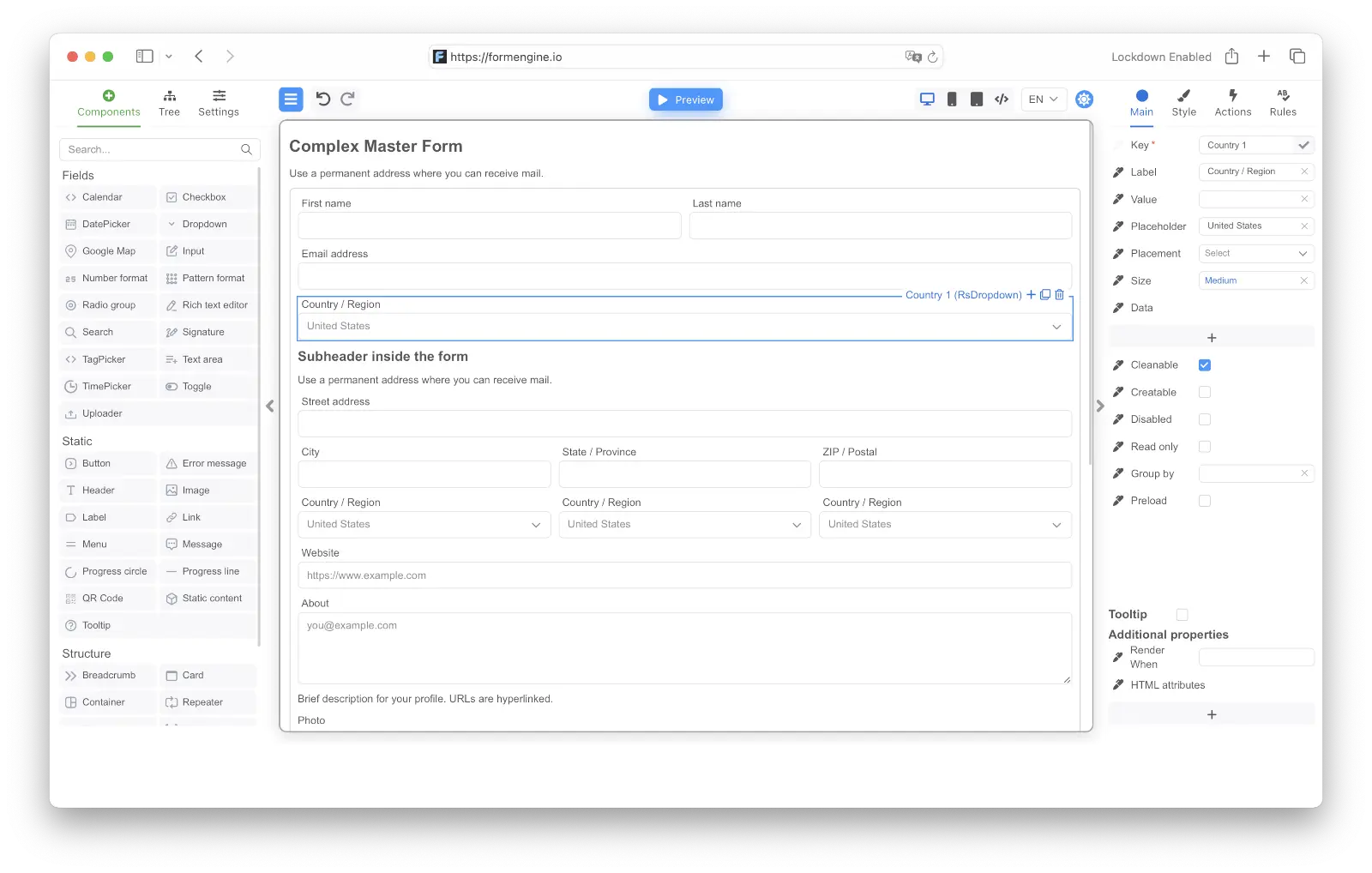
What are JSON-driven forms?
A traditional React form is written as JSX: you compose<input>, <label>, and validation logic directly in your component. If the form needs to change, you change the code and redeploy.
A JSON-driven form separates the form definition from the rendering engine. The schema is a data object — it can live in a file, a database, or an API response. A renderer reads the schema and produces the form. The result looks identical to the user; the difference is architectural.
FormViewer and you get a working, validated React form.
Why use JSON for forms instead of JSX?
1. Forms that change without a code deploymentIf your forms live in a database and are served via API, you can update them without touching the codebase. This is essential for admin panels, CMS-driven forms, A/B testing different form configurations, or any scenario where business requirements change faster than deployment cycles. 2. Single source of truth across systems
The same JSON schema can be stored once, rendered in a React app, validated server-side, exported as a PDF form, or sent to an external service. With JSX forms, every environment needs its own implementation. 3. Visual authoring for non-developers
JSON schemas can be generated by visual form builders (drag-and-drop editors) and consumed by runtime renderers. This lets product managers, support teams, and operations staff create and modify forms without a developer involved. 4. Reuse and versioning
Form schemas are data — you can store them in a database with versioning, copy them between environments, diff them in version control, and roll them back like any other data artifact. 5. Multi-tenant form management
SaaS products that need different forms per customer can store per-tenant schemas and serve them dynamically. No code branch for each customer’s requirements.
When JSON forms are NOT the right choice
It’s worth being honest about this because many comparisons skip it. JSON-driven forms add complexity. If your forms are stable, code-owned, and unlikely to change independently of your codebase, the overhead of a JSON schema layer is not worth it. Specifically:- Simple static forms — login, registration, contact — that will never change don’t benefit from JSON-driven architecture. React Hook Form or plain HTML will be simpler.
- Extremely custom UI requirements — if every field is a bespoke interactive component, the renderer will need heavy customization. Code-first is cleaner.
- Very small bundles required — JSON form renderers are larger than lightweight code-first libraries. If bundle size is a critical constraint, TanStack Form (~12 KB) or React Hook Form (~26 KB) are better choices.
- Tight TypeScript end-to-end — if you need full type inference from schema to field value, code-first approaches like TanStack Form have an architectural advantage.
JSON form libraries in React: 2026 comparison
| Library | License | JSON Schema format | Visual builder | Active development | MUI support | Bundle (gzip) |
|---|---|---|---|---|---|---|
| FormEngine Core | MIT | FormEngine schema | FormEngine Designer | Yes | Native adapter | ~245 KB / ~190 KB w/ MUI |
| RJSF (react-jsonschema-form) | Apache 2.0 | JSON Schema draft-07 | No | Yes | Theme package | ~176 KB default |
| Uniforms | MIT | Zod, JSON Schema, SimpleSchema | No | Yes | Theme package | ~15–20 KB core + theme |
| Formily | MIT | JSON Schema draft-07 | Formily Designable | Yes | Via @formily/antd | ~50 KB core |
| SurveyJS | Commercial | SurveyJS schema | SurveyJS Creator | Yes | Theme package | ~427 KB default |
- FormEngine — best when you need runtime rendering + an embeddable visual designer in one stack, and you’re using MUI or Mantine
- RJSF — best when you already have JSON Schema definitions from your backend and need a straightforward renderer; limited customization
- Uniforms — best when you want to auto-generate forms from existing Zod/JSON Schema data models; no visual authoring
- Formily — best for complex enterprise forms with reactive cross-field dependencies; steeper learning curve, strong Ant Design ecosystem
- SurveyJS — best for surveys, questionnaires, and research forms; commercial licensing required for the visual creator
FormEngine architecture in depth
FormEngine Core separates the form definition from the renderer with a pluggable component layer:view prop is a component adapter that maps string type names (e.g. "MuiTextField") to actual React components. Pre-built adapters exist for Material UI and Mantine. You can build adapters for any component library.
The engine handles:
- Form state management
- Field-level and form-level validation (Zod-backed)
- Conditional rendering (
renderWhenexpressions) - Computed properties (
computeType: "function") - Event handling and action sequences
- Localization
The FormEngine JSON schema format
A FormEngine schema is a JSON object with the following top-level structure:Real-world patterns
Conditional fields
Show or hide fields based on other field values usingrenderWhen:
form.data (the current form values) on every change. When it returns falsy, the field is hidden and its value is excluded from form data. See Conditional Logic for the full reference.
Computed field values
Derive a field’s display value from other fields usingcomputeType: "function":
Nested and repeatable fields
Use container components (MuiStack, MuiBox) for layout, and the Repeater component for dynamic field arrays:
Form submission with validation
Attach an action sequence to a button’sonClick event — validate first, then run your custom handler:
validate action is built-in. onSubmit maps to a custom handler passed via the actions prop to FormViewer:
Loading schema from an API
Validation with JSON-driven forms
FormEngine’s validation system uses Zod under the hood. Validation rules live in the schema alongside the field definition:viewerRef.current.formData.getValidationResult(). See Validation.
Performance considerations
JSON-driven forms do have a performance cost compared to statically compiled JSX forms:- Parse overhead: The schema is parsed at runtime. For large schemas (hundreds of fields), consider caching the parsed schema in a
useMemoand passing the stringified form viagetForm. - Bundle size: FormEngine Core adds ~245 KB gzip (or ~190 KB with MUI adapter, replacing the default components). This is larger than a code-first library. See Bundle Size Comparison for measured data.
- Re-renders: FormEngine manages its own internal state. Use
useMemoanduseCallbackto avoid re-creating thegetFormfunction andactionsobject on every render — this prevents unnecessary re-initialization of the form.
Migration from code-first to JSON-first
Moving from React Hook Form or Formik to a JSON-driven approach doesn’t require a full rewrite. The practical path is incremental:- Start with new forms: write any new forms as FormEngine JSON schemas
- Identify high-change forms: forms that product teams request changes to frequently are the best migration candidates
- Migrate validation rules: map your current Yup/Zod rules to FormEngine’s validation schema — the concepts are similar
- Port event handlers: move
onSubmithandlers to FormEngineactions— the function signatures are different but the logic is identical - Enable visual authoring optionally: once a form is in JSON, product managers can use FormEngine Designer to make changes without developer involvement
Next steps
- Dynamic form from JSON tutorial — build your first FormEngine form step-by-step
- Multi-step form tutorial — wizard with per-step validation
- Conditional fields tutorial —
renderWhenpatterns in practice - Validation with Zod — use Zod schemas as custom validators
- Workflow approval forms — real-world case: multi-step approval with role-based fields
- Customer onboarding forms — plan-tiered onboarding with CRM pre-fill
- Inspection and data collection — Repeater, conditional follow-ups, signature capture
- FormEngine Core concepts — rendering, form data, actions, computed properties
- Core architecture deep dive — schema model, validation pipeline, view adapter
- Form library comparisons — FormEngine vs React Hook Form, Formik, RJSF, and more
- Bundle size benchmark — measured gzip sizes across scenarios
- FormEngine on GitHub — MIT source code and examples
- FormEngine Designer — let users build JSON forms visually; pricing