

TL;DR
Both FormEngine and RJSF render React forms from a JSON schema. RJSF uses the JSON Schema specification directly as its rendering model, which makes it a strong fit for API-first teams that already produce JSON Schema from their backend. FormEngine uses a proprietary JSON format optimized for UI behavior — conditional logic, actions, computed properties — and adds an optional visual drag-and-drop editor. If you only need schema-driven rendering with minimal UI customization, RJSF is simpler. If you need a visual builder, richer behavioral logic, or UI library flexibility, FormEngine is the stronger fit.The core architectural difference
RJSF: render directly from JSON Schema spec
RJSF maps standard JSON Schema properties (type, properties, required, enum, etc.) to React
form fields. The schema you write for validation is the same schema you use to render the form. This
makes RJSF a natural fit for backends that already generate JSON Schema.
- Uses the JSON Schema specification as-is
- Strongly typed field mapping from schema keywords
- Theming via UI schema overlay for presentation changes
- Limited built-in support for complex UI behaviors (conditional show/hide, computed fields)
- No visual editor for non-developers
FormEngine: render from a UI-optimized JSON schema
FormEngine uses a JSON format designed around UI behavior: actions, events, conditional rendering, computed properties, and repeaters. It is closer to a UI configuration language than a data validation schema.- Richer schema vocabulary for UI logic
- Native conditional rendering, computed properties, and actions in the schema
- Optional visual drag-and-drop editor (FormEngine Designer)
- Modular UI layer: swap to Material UI, Mantine, or custom components
Feature comparison
| Feature | RJSF | FormEngine |
|---|---|---|
| Schema format | JSON Schema specification | Proprietary UI-oriented JSON |
| Conditional field logic | Limited (via uiSchema or custom widgets) | Native, declarative in schema |
| Computed properties | Not built-in | Native with Computed Properties |
| Actions and events | Not built-in | Native with Actions and Events |
| Visual drag-and-drop editor | Not available | Native with Designer |
| Multi-step / wizard | Not built-in | Built-in Wizard component |
| UI library flexibility | Theme-based (limited swap depth) | Modular: full UI library replacement |
| Bundle size with default UI (login form, gzipped) | 176 KB | 245 KB |
| Bundle size with Material UI (login form, gzipped) | 233 KB | 190 KB |
| Bundle size with Mantine (login form, gzipped) | 259 KB | 172 KB |
| TypeScript support | Supported | Supported |
| Open source license | Apache-2.0 | MIT (Core) |
| Commercial version | No | Yes — Designer pricing |
| Non-developer form editing | Not supported | Supported via Designer |
| Backend schema reuse | Excellent (JSON Schema is the schema) | Requires schema adapter |
| Validation approach | JSON Schema validation | Schema-driven + Zod support |
Bundle size benchmark
This comparison uses real measurements. Both libraries were tested with a login form and a complex booking form, using Vite with gzip enabled.Login form (gzipped)
| Library | Default UI | With Material UI | With Mantine |
|---|---|---|---|
| RJSF | 176 KB | 233 KB | 259 KB |
| FormEngine Core | 245 KB | 190 KB | 172 KB |
Complex booking form (gzipped)
| Library | Default UI | With Material UI | With Mantine |
|---|---|---|---|
| RJSF | 179 KB | 236 KB | 285 KB |
| FormEngine Core | 318 KB | 201 KB | 245 KB |
When RJSF is enough
- Your backend already produces standard JSON Schema and you want zero schema translation
- Your forms are simple: render fields, collect values, validate on submit
- You do not need a visual editor for non-developers
- Your team prefers the JSON Schema standard over a proprietary format
- Minimal JavaScript footprint with default UI is a priority
When FormEngine is a better fit
- You need conditional field visibility, computed values, or action-triggered logic in the schema
- You are building a product that lets non-developers edit forms visually
- You use Material UI or Mantine and want to minimize total bundle size
- You need multi-step wizard forms without custom state management
- You want to embed a form builder inside your own application
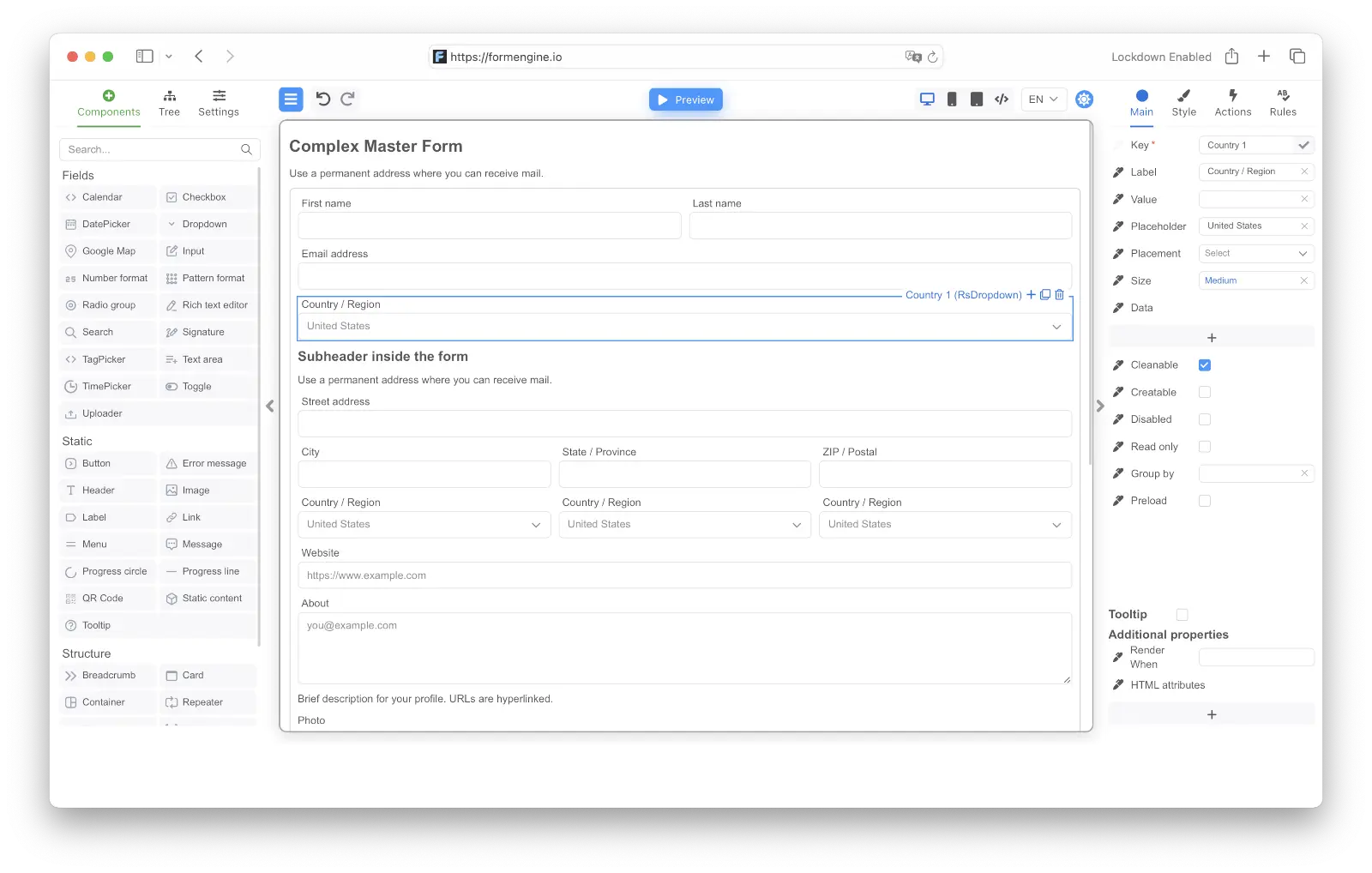
Incremental migration path
- Keep stable RJSF flows running — do not migrate what works.
- Identify forms that need visual editing, conditional logic, or computed behavior.
- Rebuild those forms in FormEngine Core with its JSON schema format.
- Move dynamic logic (show/hide, computed values) to FormEngine’s native schema features.
- Add FormEngine Designer for forms that non-developers need to edit.
FAQ
Is FormEngine compatible with the JSON Schema specification?
FormEngine uses its own JSON format, not the JSON Schema specification. If your backend generates standard JSON Schema, you will need a transformation layer to convert it to FormEngine’s format. This is a real tradeoff: RJSF consumes JSON Schema directly, which is simpler for API-first teams.Which library has a smaller bundle size?
It depends on your UI library setup. With default UI, RJSF is smaller (176 KB vs 245 KB for a login form). With Material UI, FormEngine is smaller (190 KB vs 233 KB). With Mantine, FormEngine is also smaller (172 KB vs 259 KB). See the full benchmark for details.Does RJSF support conditional field logic?
RJSF supports conditional rendering through theif/then/else JSON Schema keywords and custom
widget implementations. It works for straightforward cases but can become complex for
multi-condition or action-based logic. FormEngine handles this natively in its schema without custom
code.
Can I use FormEngine with Material UI like RJSF?
Yes. FormEngine has a dedicated Material UI view package. Unlike RJSF, where MUI adds to the bundle, FormEngine replaces its default component layer with MUI, which actually reduces bundle size in tested scenarios.Which library is better for a team that uses TypeScript strictly?
Both support TypeScript. RJSF benefits from the JSON Schema specification being well-typed. FormEngine provides TypeScript types for its schema format and component props. Neither has a significant advantage here for most teams.Is there a visual form builder for RJSF?
RJSF does not include a visual editor. Third-party tools exist that generate RJSF-compatible schemas, but they are not maintained in the same ecosystem. FormEngine includes a native visual designer as a first-party product.Is FormEngine free?
FormEngine Core is MIT-licensed and free. FormEngine Designer (the visual drag-and-drop builder) is a commercial product. See pricing.Next steps
- See the complete benchmark data: Bundle Size Comparison.
- Explore FormEngine’s schema model: JSON Schema Reference.
- Try the full form builder: Online Demo.
- Review all comparisons: Form Library Comparisons.