FormEngine Designer Overview

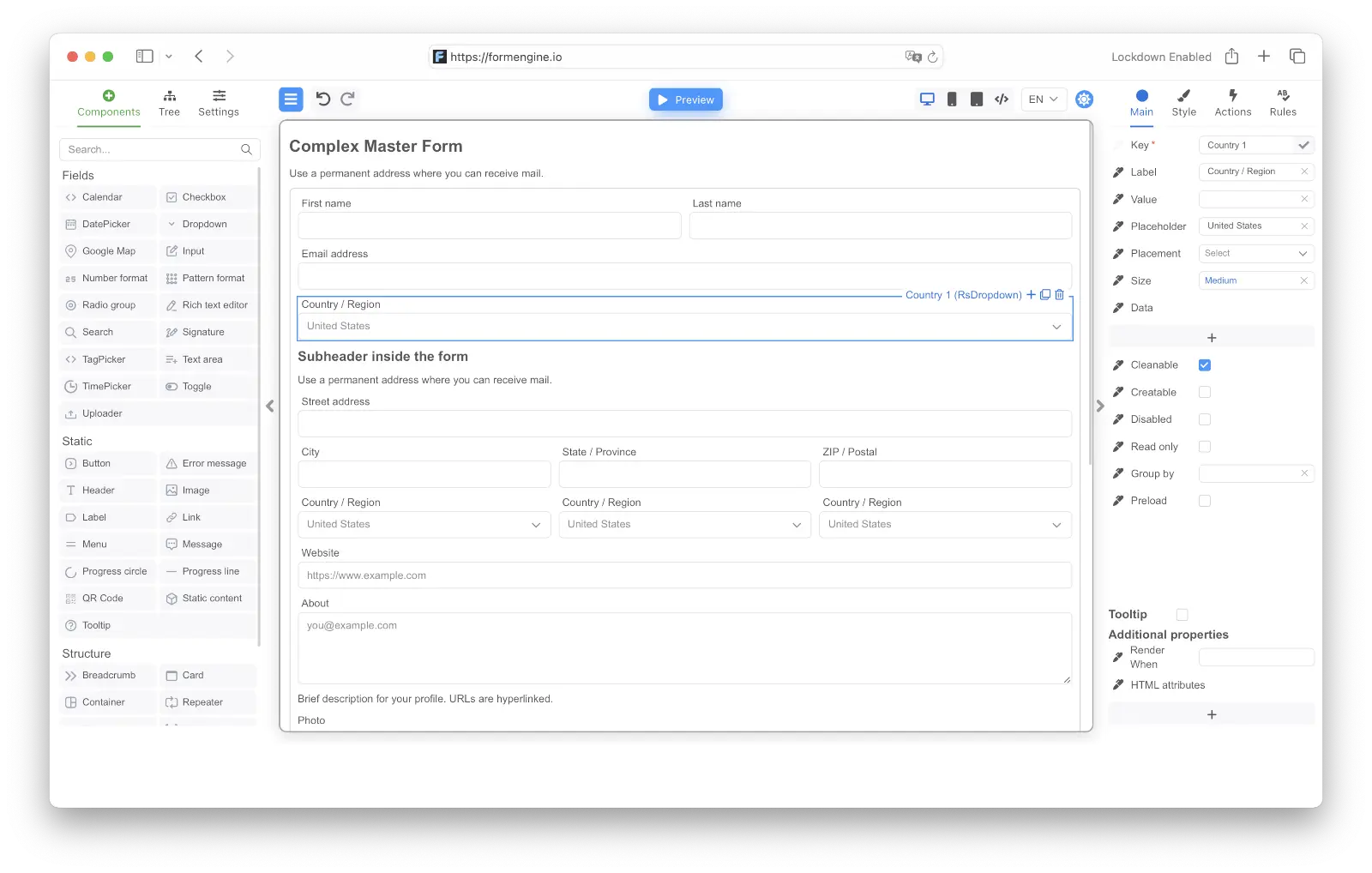
FormEngine Designer is the visual builder for creating FormEngine forms without editing the JSON by hand. Use it when you want product teams, developers, or internal users to compose forms through a drag-and-drop interface and still ship the result into the same runtime model used by FormEngine Core. Designer is for authoring. Core is for runtime. Designer helps you build the schema. Core helps you render and execute it. The builder UI looks like this: Designer overview example

What Designer is for

Use Designer when:
  • forms should be built visually instead of manually authored in JSON
  • non-developer or semi-technical users should create or edit forms
  • your product needs a reusable internal form builder
  • you want to configure fields, validation, actions, and layout from a UI
Typical use cases:
  • internal admin form builder
  • customer-facing configurable workflows
  • low-code form authoring for product teams
  • form templates that are later rendered in apps with FormEngine Core

How it works

Designer is the authoring layer of FormEngine.
  • @react-form-builder/designer provides the builder UI
  • @react-form-builder/core provides runtime rendering and execution
  • component packages such as @react-form-builder/components-rsuite provide the actual component definitions used by both layers
  • the output of the design process is a form schema that the viewer can render
Keep the split clear:
  • Designer is not required to run forms in production
  • Core is required to render forms at runtime
  • component libraries define what is available to both the builder and the viewer

Main packages

The Designer ecosystem is built around a few core packages:
  • @react-form-builder/core
  • @react-form-builder/designer
  • @react-form-builder/components-rsuite
  • optional specialized packages such as QR and rich text component packages
At a high level:
  • core is the runtime foundation
  • designer is the visual editing environment
  • component packages provide the field, structure, and display components available to the builder

What users can do in Designer

Designer gives users a visual environment for:
  • dragging components onto a canvas
  • editing properties
  • changing styles
  • configuring validation
  • wiring actions
  • switching between edit and preview
  • exporting or storing form JSON
It bridges product configuration and runtime behavior.

How Designer fits with Core

One of the most important things to understand is that Designer and Core are closely related but not interchangeable. Typical flow:
  1. define a component set through metadata
  2. render the Designer for authoring
  3. save the produced form JSON
  4. render the saved schema later with Core through FormViewer
Read the Designer and Core sections together.

Designer vs writing JSON by hand

Both approaches are valid, but they optimize for different teams:
  • use Designer when visual authoring, governance, and repeatability matter
  • write JSON directly when the form is code-driven and the team prefers manual schema control
Many teams use both:
  • Designer for authoring and exploration
  • code and version control for packaging, review, or generated workflows

What makes Designer valuable

Designer is especially valuable when your application needs:
  • faster form iteration
  • reusable templates and presets
  • visual governance over field configuration
  • a safer editing surface than direct schema editing for non-specialists
Its value increases as forms become more frequent, more configurable, or more distributed across teams.

Common mistakes

  • treating Designer as if it replaces Core at runtime
  • assuming visual authoring removes the need to understand the underlying data model
  • adding Designer when the product only needs a few hardcoded forms
  • exposing the builder before the component library and storage model are thought through

Best practices

  • treat Designer as the authoring layer and Core as the runtime layer
  • decide early which component library will power the builder
  • design a storage strategy for saved form schemas
  • keep the output model compatible with how forms will be rendered later
  • use Designer when form authoring is a product capability, not just a one-off task
Designer works best as part of a clear authoring pipeline.

FAQ

No. Designer is for authoring. Form rendering at runtime is handled by FormEngine Core.
The visual builder package is @react-form-builder/designer.
Yes. The builder works from component metadata, so teams can provide their own component definitions and tailored builder views.
Not necessarily. Designer is most valuable when visual authoring, reuse, and shared editing are part of the product or team workflow.

Next steps

Read Installation

Install the designer package and set up the minimum working environment.

Read Usage

Embed the builder, define metadata, and wire the designer into your application.

Read Custom Components

Extend the designer with your own field and layout definitions.

Read Form Storage

Decide how forms will be saved, loaded, and versioned after authoring.