TL;DR: Store one schema per tenant (or per plan tier) in your database. Load the right schema at runtime based on the current user’s context. Use renderWhen for plan-gated fields, Repeater for line-item collections, and initialData to pre-populate known CRM fields. No deployment to add or change onboarding steps for a customer segment. Last reviewed: April 2026.
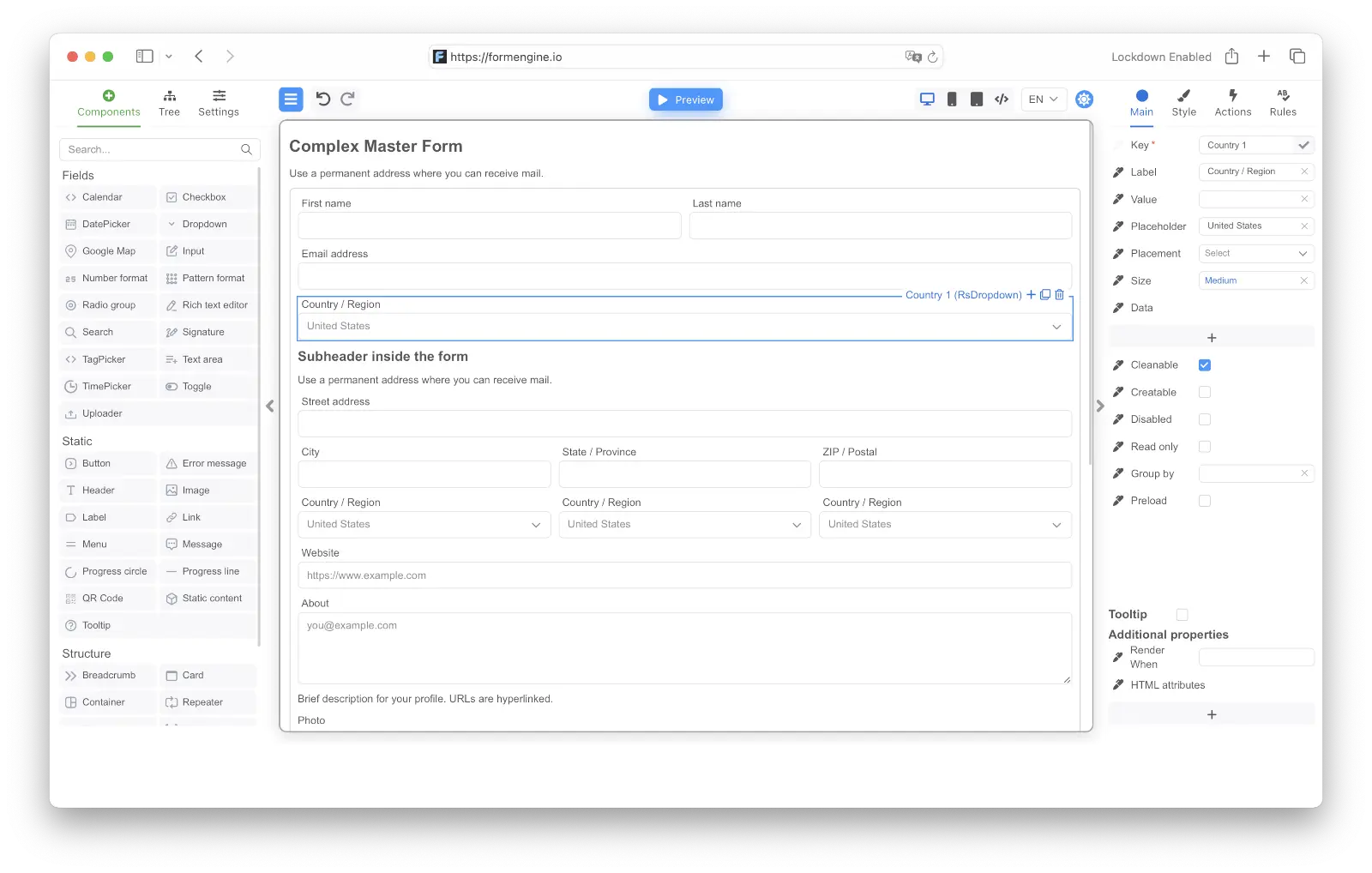
FormEngine Designer — build and update onboarding forms without code

The problem

SaaS onboarding forms have a version of the same complexity as approval workflows, but the pressure comes from product velocity rather than process governance:
  • Marketing wants to A/B test different onboarding question sequences
  • Sales wants enterprise customers to see a longer intake form than SMB customers
  • Customer success wants to pre-fill fields from CRM data so customers don’t re-enter what you already know
  • Someone always needs to add a compliance checkbox in a specific market without touching every other customer’s flow
These are all reasonable requests that, with a hardcoded form, require a developer each time.

Schema-per-plan architecture

The simplest approach: maintain one schema per plan tier in your database. When the onboarding form loads, resolve the correct schema for the current user.
// API route: resolve schema by tenant/plan
export async function GET(request: Request) {
  const { tenantId, planTier } = await getSession(request)
  const schema = await db.onboardingSchemas.findOne({
    tenantId,
    planTier, // 'starter' | 'growth' | 'enterprise'
    active: true
  })
  return Response.json({ schema: schema.definition })
}
// Client: load schema, pass CRM pre-fill data
const { schema } = await fetch('/api/onboarding/schema').then(r => r.json())
const crmData = await fetch('/api/crm/prefill').then(r => r.json())

return (
  <FormViewer
    view={view}
    form={JSON.stringify(schema)}
    initialData={crmData}
    onActionEventAsync={async (event) => {
      if (event.name === 'submit') {
        await submitOnboarding(event.args.formData)
      }
    }}
  />
)
initialData pre-populates any fields whose name matches a key in the CRM response. The customer sees their company name, billing address, and account owner already filled in — they only complete what you don’t already know.

Plan-gated fields within a single schema

If you prefer one schema for all tiers (simpler to maintain, harder to diverge), use renderWhen with an injected planTier value:
// Inject tier into initial data alongside CRM fields
<FormViewer
  view={view}
  form={JSON.stringify(schema)}
  initialData={{ planTier: session.planTier, ...crmData }}
  ...
/>
Fields visible only on Enterprise:
{
  "type": "Container",
  "name": "enterpriseSection",
  "props": { "label": "Enterprise Configuration" },
  "renderWhen": "form.data.planTier === 'enterprise'",
  "components": [
    {
      "type": "Input",
      "name": "ssoEntityId",
      "props": { "label": "SSO Entity ID" }
    },
    {
      "type": "Input",
      "name": "ssoMetadataUrl",
      "props": { "label": "SSO Metadata URL" }
    },
    {
      "type": "Dropdown",
      "name": "dataResidency",
      "props": {
        "label": "Data Residency Region",
        "options": [
          { "label": "US East", "value": "us-east-1" },
          { "label": "EU West", "value": "eu-west-1" },
          { "label": "AP Southeast", "value": "ap-southeast-1" }
        ]
      }
    }
  ]
}
The Container (and all its children) renders only when the user is on the Enterprise plan. Validation on those fields also only runs when they’re visible — a Starter user with no SSO fields filled in will pass validation cleanly.

Multi-step onboarding with a Wizard

Longer enterprise onboarding flows benefit from step-by-step presentation. Group questions into logical stages:
{
  "type": "Wizard",
  "name": "onboardingWizard",
  "props": {
    "validateOnNext": true,
    "validateOnFinish": true
  },
  "components": [
    {
      "type": "WizardStep",
      "name": "companyStep",
      "props": { "label": "Company Info" },
      "components": [
        { "type": "Input", "name": "companyName", "props": { "label": "Company Name", "required": true } },
        { "type": "Input", "name": "website", "props": { "label": "Website" } },
        {
          "type": "Dropdown",
          "name": "industry",
          "props": {
            "label": "Industry",
            "required": true,
            "options": [
              { "label": "Technology", "value": "tech" },
              { "label": "Financial Services", "value": "finserv" },
              { "label": "Healthcare", "value": "healthcare" },
              { "label": "Manufacturing", "value": "manufacturing" },
              { "label": "Other", "value": "other" }
            ]
          }
        }
      ]
    },
    {
      "type": "WizardStep",
      "name": "teamStep",
      "props": { "label": "Team Setup" },
      "components": [
        {
          "type": "Repeater",
          "name": "adminUsers",
          "props": { "label": "Admin Users", "addLabel": "Add Admin" },
          "components": [
            { "type": "Input", "name": "email", "props": { "label": "Email", "required": true } },
            { "type": "Input", "name": "firstName", "props": { "label": "First Name" } },
            { "type": "Input", "name": "lastName", "props": { "label": "Last Name" } }
          ]
        }
      ]
    },
    {
      "type": "WizardStep",
      "name": "configStep",
      "props": { "label": "Configuration" },
      "renderWhen": "form.data.planTier === 'enterprise'",
      "components": [
        { "type": "Input", "name": "ssoEntityId", "props": { "label": "SSO Entity ID" } },
        { "type": "Toggle", "name": "auditLogging", "props": { "label": "Enable audit logging" } }
      ]
    }
  ]
}
The Configuration step appears only for Enterprise plan customers. SMB customers skip it entirely — there’s no “skip this step” button to confuse them.

Dynamic dropdowns from your API

Industry-specific options, regional settings, or plan-available features can be loaded from your backend at render time using the onLoadData event in the schema. Define an action that calls your API, and bind it to the dropdown via onLoadData:
{
  "actions": {
    "loadRegions": {
      "body": "const [search, done] = e.args; fetch(`/api/regions?plan=${e.data.planTier}&q=${search}`).then(r => r.json()).then(rows => done(rows.map(r => ({ label: r.name, value: r.id }))))",
      "params": {}
    }
  },
  "form": {
    "key": "Screen",
    "type": "Screen",
    "children": [
      {
        "key": "availableRegions",
        "type": "RsDropdown",
        "props": { "label": { "value": "Region" } },
        "events": {
          "onLoadData": [{ "name": "loadRegions", "type": "code" }]
        }
      }
    ]
  }
}
Pass the plan tier through initialData so the action can read it as e.data.planTier:
<FormViewer
  view={view}
  form={JSON.stringify(schema)}
  initialData={{ ...crmData, planTier: session.planTier }}
  onActionEventAsync={async (event) => {
    if (event.name === 'submit') await submitOnboarding(event.args.formData)
  }}
/>
The dropdown options come from your backend, so plan-restricted regions never appear in the UI — and you don’t have to maintain a static list in the schema.

Segment-specific compliance fields

Some markets or industries require additional disclosures. Rather than separate forms per market, add the fields to a single schema with geo/industry conditions:
{
  "type": "Container",
  "name": "gdprSection",
  "renderWhen": "form.data.billingCountry === 'DE' || form.data.billingCountry === 'FR' || form.data.billingCountry === 'IT'",
  "components": [
    {
      "type": "Checkbox",
      "name": "gdprConsent",
      "props": { "label": "I consent to processing under GDPR Article 6(1)(b)", "required": true }
    },
    {
      "type": "Checkbox",
      "name": "dpaAccepted",
      "props": { "label": "I accept the Data Processing Agreement", "required": true }
    }
  ]
}
When a customer enters a German billing address, the GDPR section appears and becomes required. For US customers, it’s not rendered and not validated.

Letting customer success update the form

Customer success managers often know what questions are missing before product does. With FormEngine Designer embedded in your internal admin panel, a CS manager can add a question to the Enterprise onboarding schema without opening a Jira ticket:
// Internal admin: CS manager edits the Enterprise onboarding form
<FormBuilder
  view={view}
  initialForm={enterpriseSchema}
  onSave={async (updatedSchema) => {
    await db.onboardingSchemas.update({
      planTier: 'enterprise',
      definition: updatedSchema,
      updatedBy: adminSession.userId
    })
  }}
/>
The next Enterprise customer to start onboarding sees the updated question. No PR, no deploy, no dependency on an engineer’s sprint.

Tracking completion state

Onboarding forms are often saved and resumed. Use FormViewerRef to read partial data when saving progress:

const formRef = useRef<FormViewerRef>(null)

// Auto-save on blur / step change
const handleAutoSave = async () => {
  const snapshot = formRef.current?.getFormData()
  if (snapshot) {
    await fetch('/api/onboarding/progress', {
      method: 'PUT',
      body: JSON.stringify({ data: snapshot.data }),
      headers: { 'Content-Type': 'application/json' }
    })
  }
}

<FormViewer
  ref={formRef}
  view={view}
  form={JSON.stringify(schema)}
  initialData={savedProgress ?? crmData}
  onActionEventAsync={...}
/>
On the next session, load savedProgress as initialData and the customer resumes where they left off.

FormEngine on GitHub · npm · Pricing
Last modified on April 16, 2026